AI Chatbots for Customer Support: Deflection, Limits & Human Handover
AI chatbots can improve customer support by handling routine queries, reducing response times, and freeing human agents for complex issues. But high deflection rates don't always mean satisfied customers. This article explores chatbot capabilities, limitations, human handover strategies, and key performance metrics, helping businesses implement reliable AI support systems that prioritize genuine problem resolution and customer trust over automation alone.
Picture a support team opening its dashboard on a Monday morning. There it is, the number they have been chasing for months: the chatbot handled 70% of conversations without a human. Shoulders drop. Someone says, “Nice work, everyone.”
Now look at the other 30%. These are the customers who were angry, confused or in a hurry. Some spent ten minutes going in circles with a bot before anyone noticed. A few never wrote back at all.
That is the trouble with a headline number. A chatbot can look like a roaring success while quietly letting down the people who needed help the most. (The 70% above is a made-up example, not a result from any specific project.)
At DGTAL & Web Solutions, we build chatbots for customer support, and over time we have come to a firm belief: the handover to a human is part of the product, not proof that it failed. In this article we will walk through what deflection really measures, where bots shine, where they stumble, and how to set one up so your customers can actually trust it.
What “deflection” really means
Three terms get tossed around as if they mean the same thing. They do not, so let us untangle them.
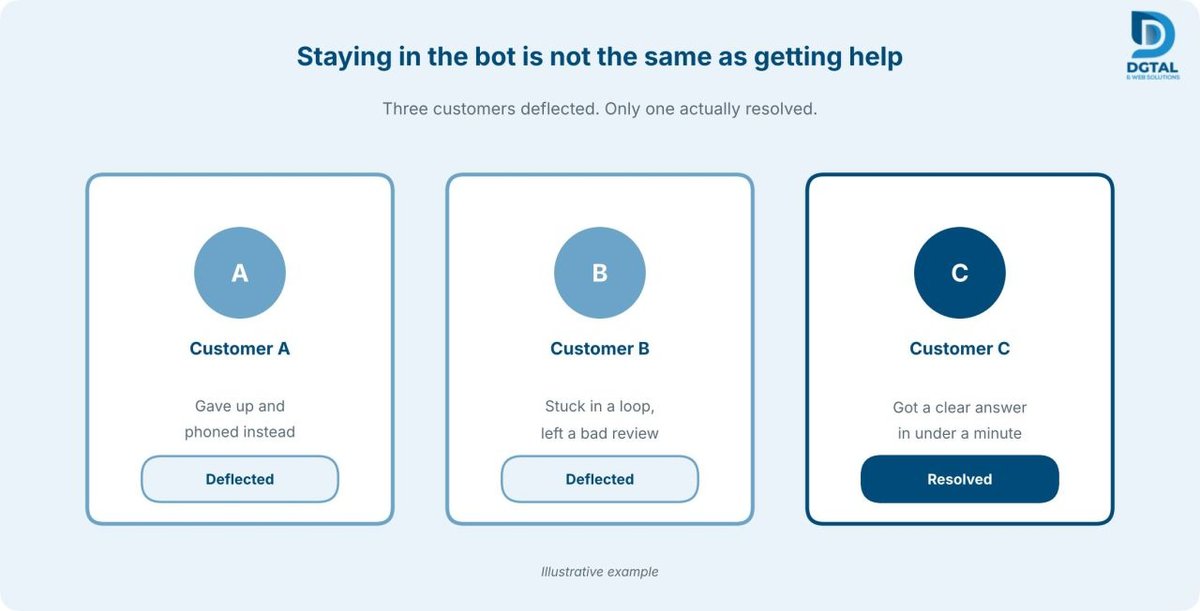
- Deflection: the customer never reached a human agent. It tells you nothing about whether their problem was solved.
- Containment: the customer stayed inside the bot. Maybe they got their answer. Maybe they simply gave up.
- Resolution: the issue was genuinely fixed. This is the number that counts.
A bot can score beautifully on the first two and badly on the third. If the “talk to a person” option is buried, deflection goes up while satisfaction goes down. The customer does not vanish, of course. They pick up the phone, leave a review, or quietly move to a competitor, and none of that shows up on the chatbot dashboard.
So the next time someone proudly quotes you a deflection rate, ask the follow-up question: “And how many of those were actually resolved?”
What chatbots do well
Give a bot the right jobs and it earns its keep. It is at its best with questions that are repetitive, factual and already written down somewhere.
- FAQs and policy lookups. Opening hours, return rules, check-in and check-out policies.
- Order and booking status. A simple lookup through your CRM or helpdesk, such as HubSpot, Salesforce or Zendesk.
- After-hours coverage. The bot answers what it can, captures the rest, and your team picks it up in the morning.
- Triage and data collection. Name, order number and issue type are gathered before a person joins, so your agent starts with context instead of a blank screen.
None of this is glamorous. But it is where most of your daily volume lives, and handing it to a bot gives your team room to focus on the conversations that truly need a human touch.
Where chatbots fall short
This is the section vendors tend to skip, so we will give it some room. A good bot is not the one that answers everything. It is the one that knows what it should not answer.
- Emotional or high-stakes moments. Someone who is upset, scared or dealing with a difficult life event needs a person, not a polite paragraph.
- Edge cases. Real customers show up with unusual combinations of circumstances that no document ever covered.
- Ambiguous requests. A bot may confidently answer a question the customer never asked. The better move is to clarify once, then hand over.
- Outdated knowledge. If the price list changed last week and the knowledge base did not, the bot will give a confident, wrong answer. That is as much a content-maintenance problem as a technology one.
- Answers beyond its sources. When there is nothing to retrieve, some bots improvise. That is how hallucinated answers happen.
- Money and legal commitments. Refunds, compensation, contract terms and promises should always pass through a human approval step.
A simple rule of thumb: if a mistake would cost real money, break a rule or damage trust, a person should be in the loop.
Designing a handover people don’t dread
Here is the design question that decides whether customers trust your bot: what happens at the exact moment it cannot help?
Know when to step aside
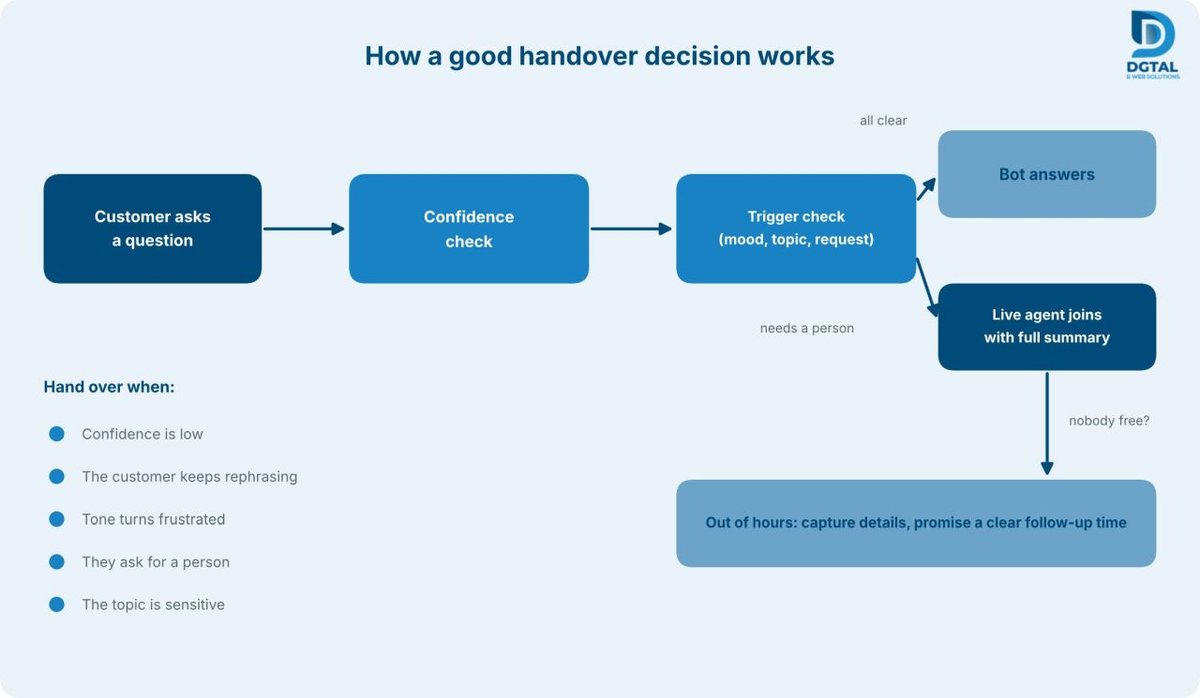
The bot should pass the conversation to a person when:
- its confidence in the retrieved answer is low,
- the customer keeps rephrasing the same question,
- the tone turns negative or frustrated,
- the customer asks for an agent (this should always work, instantly), or
- the topic is sensitive, such as payments, legal issues, complaints or safety.
Make it warm, not cold
The worst moment in support is explaining your problem to a bot, then explaining it all over again to a human. Your agent should receive the full transcript plus a short summary of what the customer wants and what has already been tried. The test is simple: the customer should never have to repeat themselves.
Plan for out-of-hours
If nobody is available, say so. Give an honest expected response time, capture the customer’s contact details and the issue, and offer a callback or a next-morning follow-up. It is silence that damages trust, not an honest “we’ll get back to you by 10am.”
Keeping answers grounded
Most reliable support bots use something called retrieval-augmented generation, or RAG. In plain terms, the bot looks up answers in your own approved documents, such as policies, FAQs and product information, instead of inventing them from general knowledge.
RAG reduces unsupported answers, but it does not make them impossible, which is why we never promise “zero hallucinations.” What it does give you is something you can check. Three habits make the real difference:
- Approved knowledge only. If the answer is not in the source material, the bot should not make one up.
- Let “I don’t know” be a good answer. “I’m not sure, let me connect you with someone” beats a confident wrong reply every single time.
- Read the logs. Log every conversation and review them. A weekly look through real chats shows you wrong answers, missing content and the new questions your customers are asking.
It also helps to name one person who owns the knowledge base. When a policy changes, someone needs to update the bot the same day.
Metrics that matter
Skip the vanity numbers. These are the ones worth watching:
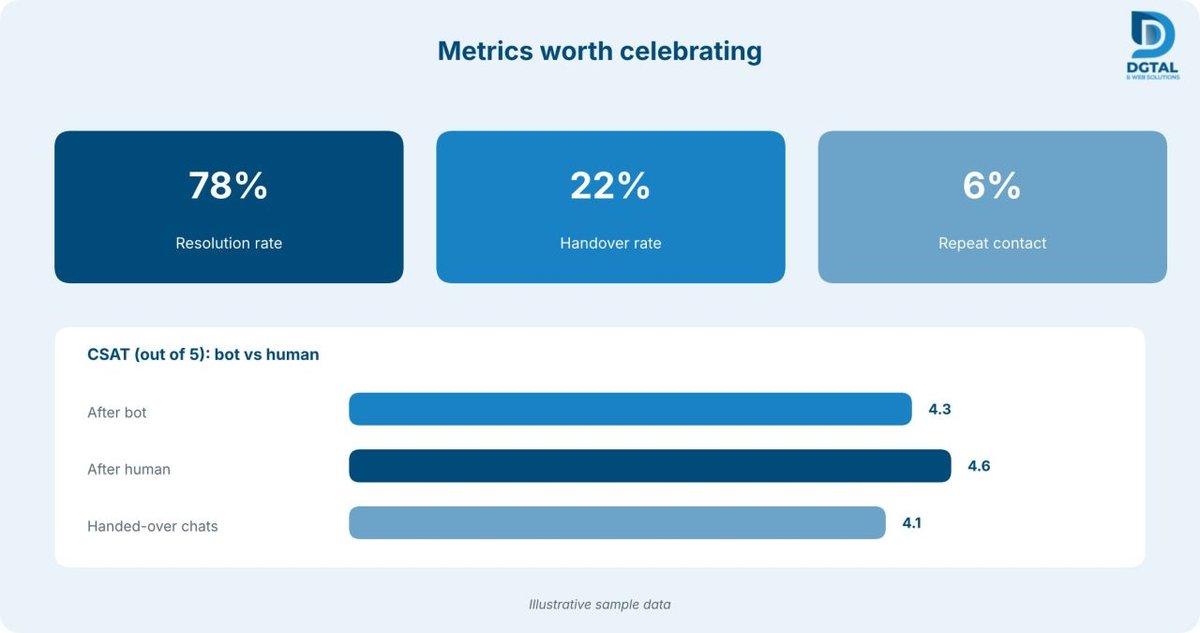
- Resolution rate: issues actually solved, ideally confirmed by the customer or by no repeat contact.
- Handover rate: too low may mean the bot is trapping people, and too high means it is not useful yet.
- CSAT after bot vs. after human: compare the two, and look at handed-over conversations separately.
- Repeat contact rate: a customer coming back about the same issue is a sign of a false resolution.
- Escalation reasons: why chats were handed over tells you exactly what to fix or add next.
Deflection can still sit on the dashboard. Just make sure it is not the number you celebrate.
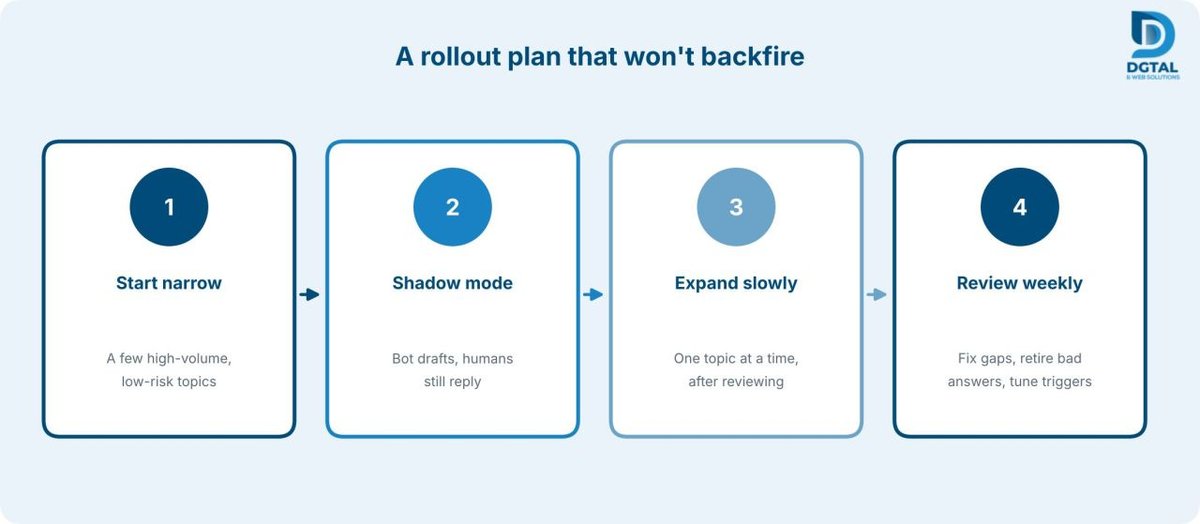
A rollout plan that won’t backfire
The safest way to launch is slowly.
- Start narrow. Pick a few high-volume, low-risk topics, like opening hours and booking status.
- Run in shadow mode. The bot drafts answers while humans still reply, so your team can compare quality before any customer sees it.
- Expand one topic at a time, and only after reviewing how the last one performed.
- Review the logs weekly. Fix gaps, retire bad answers and tighten your handover triggers.
A standard bot can be live in around 10 to 14 business days, and more complex ones take 3 to 4 weeks. But the real work happens in the weeks after launch, when you learn what your customers actually ask.
Frequently Asked Questions
Will a chatbot replace my support team?
No. A bot takes on the repetitive questions so your people can spend their time on complex and emotional cases. We build AI to assist your staff, not to replace them.
How do I stop wrong answers?
Combine grounded retrieval from approved content, confidence checks, the freedom to say “I don’t know,” logging and regular reviews. This lowers the risk a great deal, but no honest vendor can promise it drops to zero.
When should the bot hand over?
When its confidence is low, the customer keeps rephrasing, the tone turns negative, they ask for an agent, or the topic is sensitive.
What does it cost to start?
It depends on scope: which channels you need (WhatsApp, web, Slack), which systems it connects to, and how many documents it needs to learn from. A scope call is the quickest way to get a realistic estimate.