How to Get Your Hotel's Own Booking Link on Google: The 2026 GM Playbook
Most hotel websites lose direct bookings to common, fixable problems such as slow loading speeds, thin or copied content, weak local signals, and cumbersome booking flows. To help independent hotels win back direct reservations and reduce high OTA commission fees (roughly 15% to 25%), this article provides a prioritized, tick-box checklist of 25 practical fixes divided into five logical groups.
Look at your hotel on Google the way a guest does
Search for your hotel on Google. Pick some dates and look at the booking panel.
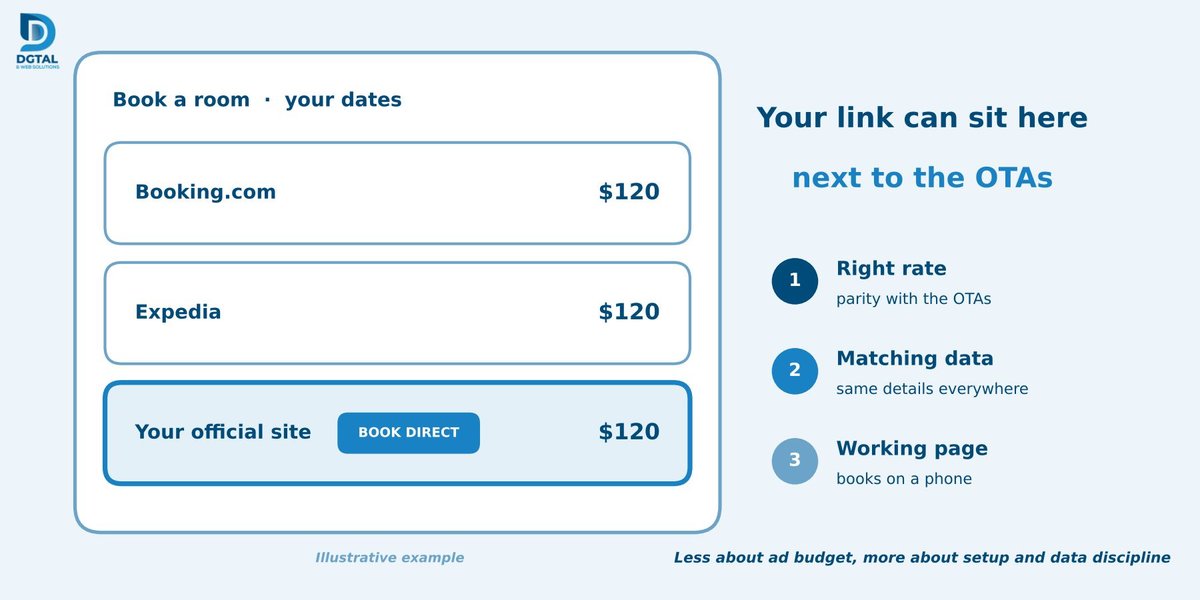
Booking.com is there with a rate. Expedia is there with a rate. Your own website is either missing or tucked away under a "more options" tab. A guest who was already looking for you is about to book through someone else, and you'll pay that platform a commission of roughly 15 to 25% for the privilege.
Here's the part that surprises many GMs: your own link can sit in that same panel. Getting there has far less to do with advertising budget than with setup and data discipline. The rate has to be right, the property data has to match, and the booking page has to work on a phone.
At DGTAL & Web Solutions, we manage Google Hotel Center and Google Business Profile for hotels, so this is the playbook we'd hand a general manager on day one. It covers what to set up, who owns each piece and how to tell whether it's paying off. One promise up front: nobody can guarantee a position in Google's results, and this article won't pretend otherwise.
How Google's hotel results work
Google shows hotel information in a few different places, and it helps to know which is which.
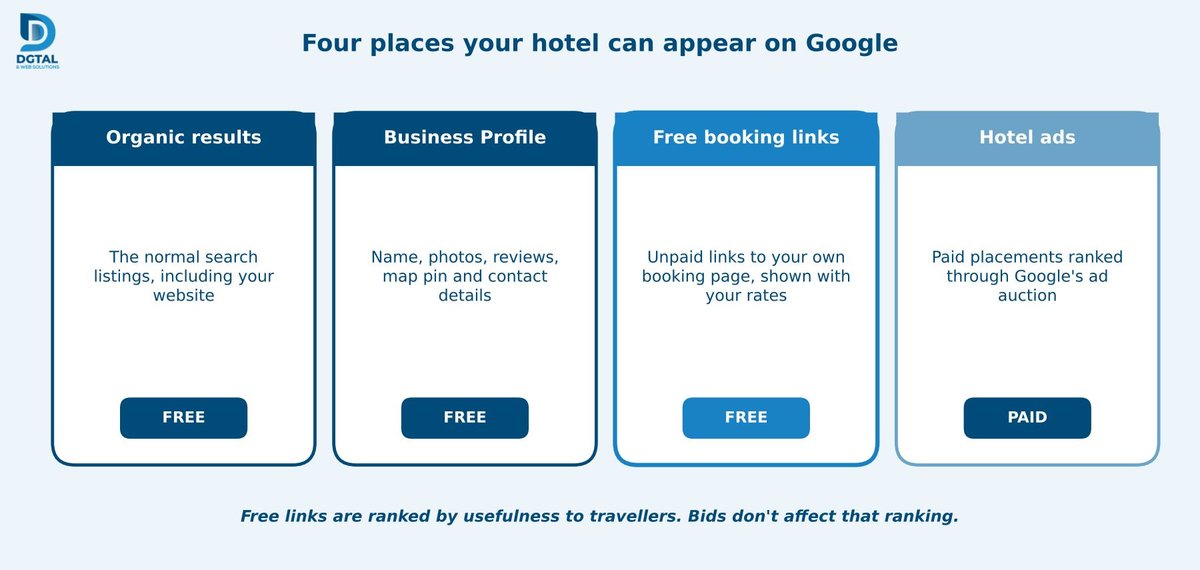
- Organic results are the normal search listings, including your website.
- Your Business Profile is the panel with your name, photos, reviews, map pin and contact details.
- Free booking links are unpaid links to your own booking page, shown with your rates in the hotel booking module. Google says they're ranked by how useful they are to travellers, and that your bids have no effect on that ranking.
- Hotel ads are the paid placements, ranked through Google's ad auction. Google may show free links alongside them in the same module.
So "free" is accurate in one sense: you don't pay for clicks. But it isn't effortless. Google needs current rates and availability for your property, a landing page that can actually complete the booking, and a link between your property data and the right Google listing. A free link pointing at a broken booking flow just loses the guest more politely.
One more caution. Google's eligibility rules, partner requirements and terms change over time. We checked Google's current Hotel Center documentation while preparing this article, but please confirm the details on Google's own help pages before you act on them.
What you need before you start
Get these four things in place first. They'll save you weeks later.
- A verified Google Business Profile. Everything else attaches to this. Check that it has the right category (hotel), accurate contact details and a correct map pin.
- A direct booking engine that works well on a phone. Guests land on a specific room and rate. The engine has to take those dates, load that rate and complete the reservation without making the guest start again.
- A way to send rates and availability to Google. For most hotels, this comes through a booking engine, channel manager or other connectivity partner that works with Google Hotel Center. Some individual hotels have been able to enter rates directly through their Business Profile where they qualify, but availability of that route varies, so ask Google and your provider what applies to you. If you're not sure whether your current provider supports Google, ask them today. It's often the quickest question to answer and the most expensive one to skip.
- A single source of truth for property details. Your check-in time, cancellation policy, breakfast terms and room names need to say the same thing everywhere. If they don't, start with our guide to the Hotel Details Consistency Audit (link once published).
It's also worth checking what Google counts as a hotel. In general, that means a property with a front desk or on-site management, that accepts overnight guests and has a publicly listed address. Vacation rentals are treated differently.
Step-by-step setup in Google Hotel Center
The exact screens change, and your connectivity partner will handle some of this for you. The sequence stays the same.
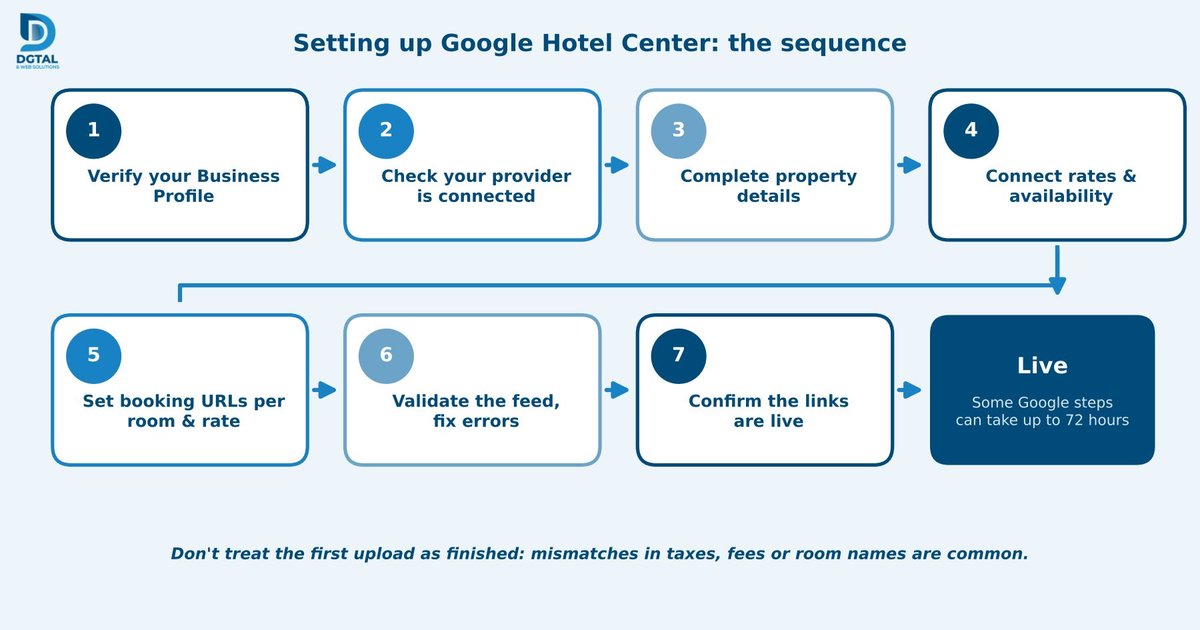
- Verify your Business Profile and confirm it's the right listing. Make sure the name, address and phone number match what you give your booking provider. Mismatches here cause mapping problems later.
- Find out whether your provider is already connected to Google Hotel Center. If you already take part in Hotel Ads through a partner, Google says you're automatically eligible to show free booking links. If you're new, Google has a starter guide for hotels, and your provider can often set the connection up for you.
- Complete your property details. Add room types, photos and amenities, and keep them accurate.
- Connect rates and availability. Your provider sends these through. Check that each room type in your booking engine is matched to the right room type on Google.
- Set up the landing page and booking URL for each room and rate. A guest clicking a rate should arrive at a page showing that same rate.
- Validate the feed and fix errors. Don't treat the first upload as finished. Mismatches in taxes, fees or room names are common.
- Confirm the links are live. Search your hotel on Google, enter dates when you have availability and look for your official site in the booking module, often under "all options." Allow time for things to appear. Some account links, such as connecting Hotel Center to Google Ads, can take up to 72 hours.
What influences how you show up
Google doesn't publish its full ranking factors, so treat this list as practical levers, not a formula. Google's own description is that free links are ranked by usefulness to users, and these are the things that plausibly make a link more useful.
- Rate competitiveness and parity. If the OTAs show a lower price for the same room, a guest has little reason to choose you.
- Accurate, complete property data. Missing room types or thin descriptions weaken your listing.
- Reviews. Volume, recency and score all shape how a guest sees you.
Booking flow quality and page speed. A guest who bounces from a slow page tells Google something. - Consistent details across your website, Google and the OTAs. Conflicts create doubt for guests and for machines.
None of these guarantees a position. They're simply the things you control.
Winning the click: rates, parity and perks
Think of it in two parts. Parity gets you into the panel. Perks win the click.
If your direct rate is higher than the OTA's for the same room, you're asking the guest to pay more for the privilege of booking with you. Most won't. So the first job is to make sure your direct rate is at least level with the OTAs.
Once you're level, give guests a reason to choose you. The perks that work are the ones guests can see and trust:
- Flexible cancellation
- Breakfast included
- Late check-out
- Member or returning-guest rates
Be honest about what you offer, and make sure each perk is stated on the landing page as well as in the panel.
A rate-integrity warning: the price Google shows must match the price on your landing page. If a guest clicks a rate of $120 and lands on a page showing $135, you've lost the booking and some trust. Check this regularly, especially after rate changes.
Common mistakes that keep hotels invisible
We see the same problems again and again.
- Price or availability mismatches between the feed and the website.
- Slow or broken mobile booking pages.
- Outdated check-in times and policies.
- Missing room types or thin photos.
- Unanswered reviews.
- Nobody owning the Hotel Center account. It was set up by a former employee or a vendor, and now nobody checks it.
Setup isn't a one-off job. A profile edit, a new room type or a change of booking provider can quietly break the connection, so schedule a check every quarter.
Free links vs paid hotel ads: when to add budget
In simple terms, free links give your official rate unpaid visibility, while hotel ads buy placement through an auction.
A sensible order of work is to get the free setup right first, measure it, and only then decide whether paid is worth testing, perhaps on your highest-demand dates.
A word of caution on the economics. Industry sources report that Google retired commission-based bidding (pay per stay and pay per conversion) for new hotel campaigns in 2024, so older guides that describe paying only when a guest completes a stay may be out of date. Check your options in Google Ads before you plan a budget.
Then compare the cost per booking with the commission you'd otherwise pay. Here's a simple illustration. Say a booking is worth $360 and the OTA commission is 20%, so that booking costs you $72 through the OTA. If you spend $1,000 on hotel ads and get 10 bookings, your cost per booking is $100, which is higher than the commission. (These are made-up numbers, so use your own.) Paid isn't automatically cheaper, and you also carry the risk of cancellations. That's why you measure before you spend.
Measuring results
Keep it simple and review it monthly, but judge it over a full quarter.
- Bookings and revenue from the Google channel
- Direct booking share, and OTA commission paid
- Click-through rate, conversion rate and cost per booking (if you run paid)
- Google Business Profile actions: calls, direction requests and website clicks
Take a baseline before you start so you can tell what changed. And keep your expectations honest. Technical fixes typically take a few weeks to settle, and visibility gains take months. Some months will be worse than others.
A 30-day launch plan
| week | focus | what to do |
|---|---|---|
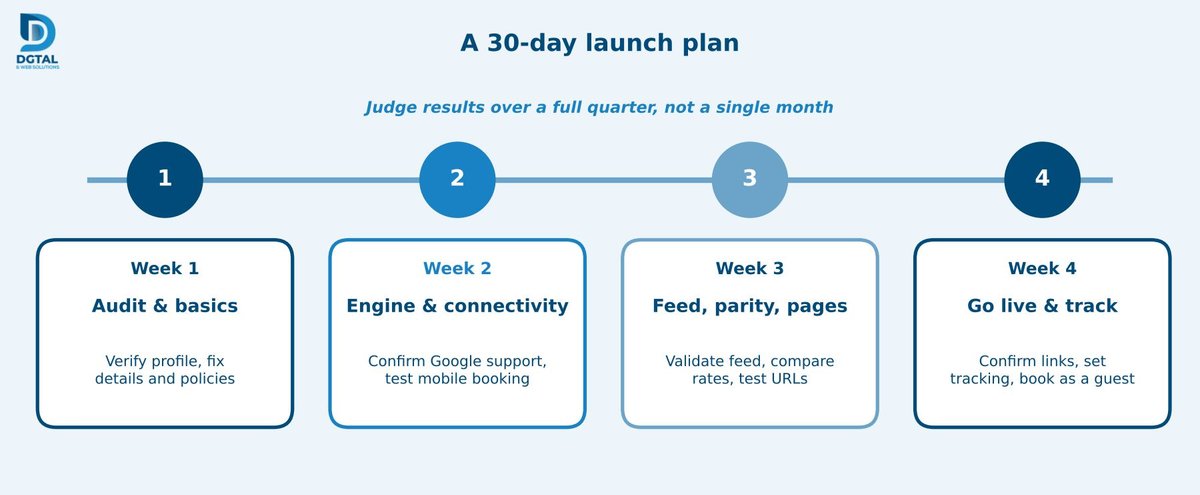
| week 1 | Audit and fix the basics | Verify the Business Profile. Settle your single source of truth. Correct property details, check-in times and policies. |
| week 2 | Booking engine and connectivity | Confirm your provider supports Google Hotel Center. Check that your booking engine works well on mobile. Start the connection. |
| week 3 | Feed, parity and landing pages | Validate the feed and fix errors. Compare direct rates with the OTAs. Test every booking URL. |
| week 4 | Go live and track | Confirm the free links appear. Set up tracking. Look at early data, and book a room yourself on your phone, as a guest would. |
So, is your own link in the panel?
Your hotel's link can compete on Google when your data, your rates and your booking flow are right. Most of the work is setup and discipline, not budget.
Want to know where you stand? Request our free 10-point Visibility & AEO Audit, delivered within 48 business hours, and we'll show you where your data and listings need attention. We also manage Google Hotel Center and Google Business Profile for hotels. If you'd like to talk it through.
book a free consultation.
Frequently Asked Questions
Are Google free booking links really free?
There's no cost for clicks on them, and Google says it doesn't collect payment for placement. You still need the right setup, which may involve fees from your booking engine or connectivity provider.
Can I guarantee my hotel will show up?
No. Google doesn't publish its full ranking factors, and placement isn't guaranteed. Accurate data, competitive rates and a working booking flow make a showing more likely.
Do I need to run paid hotel ads first?
Not necessarily. Google says existing Hotel Center partners participating in Hotel Ads are automatically eligible, and new hotels have a separate starter route. Ask your provider what applies to you.
Do I need a booking engine?
In practice, yes. Google needs live rates and a page where the guest can complete the booking.