Stop Retyping Invoices: How Intelligent Document Processing Turns Messy PDFs Into Clean Data
Retyping invoice and PDF data is slow and easy to get wrong. Intelligent document processing (IDP) reads messy documents, checks its own work and sends clean data to the tools you already use, while a person signs off on anything important. Here's what IDP is, how it works, where else it helps, how to pick a first project and how to measure the payoff.
The invoice that arrived as a photo
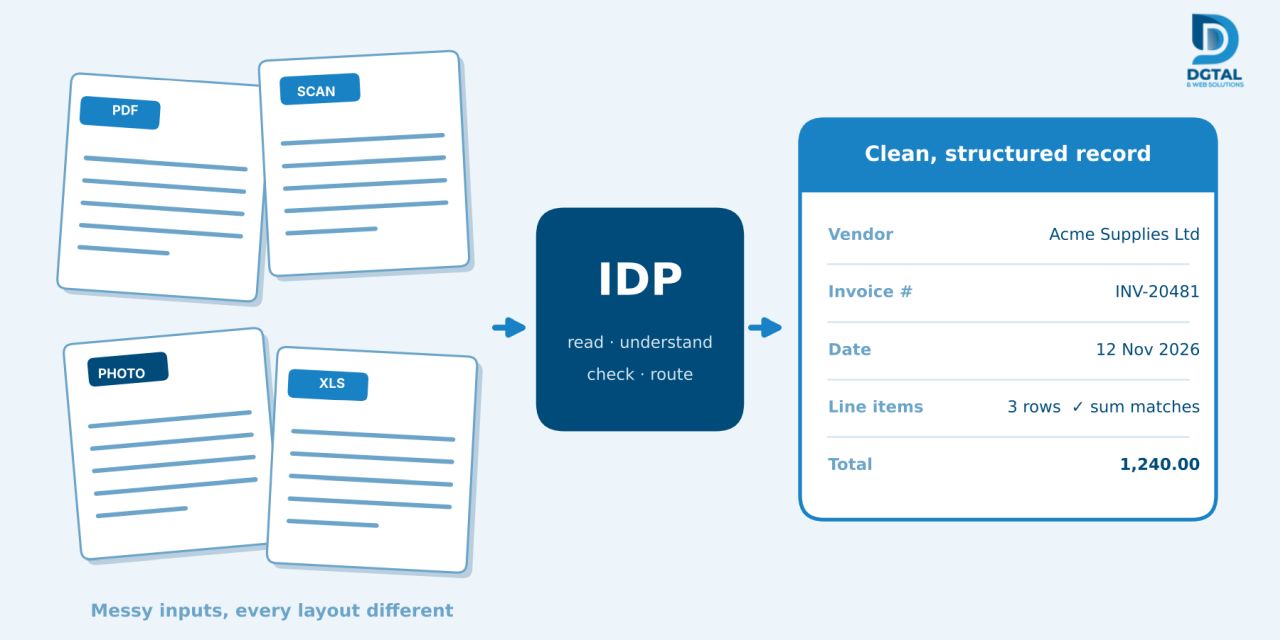
Open the shared inbox of almost any finance team and you'll see the same mix. A tidy PDF from one supplier. A scan from another. A photo snapped on a phone, a little crooked, with a coffee ring on one corner. A spreadsheet exported from a system nobody recognises. Every one of them is laid out differently, and every one of them has to end up as rows in your accounting software.
So somebody retypes it: vendor name, invoice number, date, line items, tax, total. It isn't hard work, and that's exactly the problem. People get tired and digits get swapped. One wrong figure turns into a wrong payment, a reconciliation that won't balance, or an awkward call to a supplier a month later.
The key point: this work is repetitive, follows clear rules and involves a mountain of documents. That's precisely the kind of job intelligent document processing is good at.
What IDP actually is (and isn't)
Intelligent document processing, or IDP, is software that reads a document, finds the fields that matter and hands them over as structured data your other systems can use. Instead of a PDF that only a human can make sense of, you get a record: a vendor, a date, line items and a total.
It helps to tell IDP apart from two older approaches people often mix it up with:
- Basic OCR. Optical character recognition turns pixels into text. Useful, but it has no idea what the text means. To OCR, an invoice number and a phone number are both just strings of digits.
- Template-based extraction. Here you tell the software where on the page each field lives. It works nicely until a vendor redesigns their invoice, and then it breaks without telling anyone. Every new supplier layout means more setup.
IDP adds understanding on top of reading. It knows that a number sitting next to the word "Total" is probably the total, even on a layout it has never seen. One boundary matters, though: IDP is there to assist your team, not to replace their judgment, and a well-built system makes that clear from the start.
How it works: the pipeline in four stages
Most IDP systems follow the same basic path. The diagram shows the flow, and here's what happens at each stage.
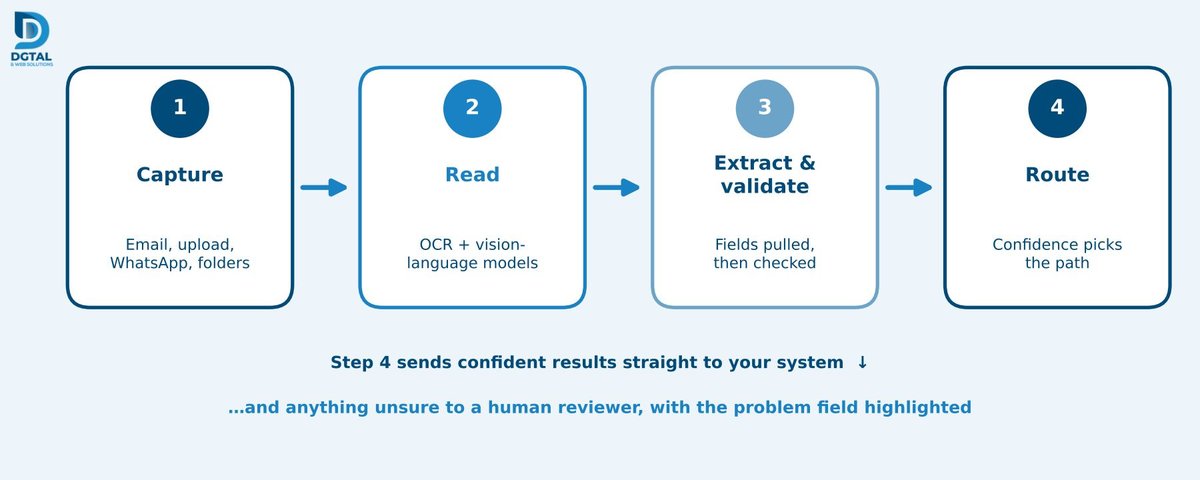
- Capture. Documents arrive from wherever they already do: an email inbox, an upload page, WhatsApp or a shared folder. Your suppliers don't have to change how they send things.
- Read. OCR works together with vision-language models to read the page the way a person would, handling printed text, tables, stamps and even handwriting.
- Extract and validate. The system pulls out the vendor, invoice number, dates, line items, tax and totals, then checks its own work. Do the line items add up to the total? Is the tax right? Have we seen this exact invoice before?
- Route. Results the system is confident about go straight into your accounting software. Anything it's unsure about goes to a human reviewer, with the problem field highlighted.
That fourth step is what makes the whole thing trustworthy in practice. Instead of pretending to be right every time, the system sorts its own work into "safe to post" and "please take a look at this."
Beyond invoices: where else it fits
Invoices are the usual starting point because the volume is high and the pain is easy to see. But the same pipeline helps anywhere people pull data out of documents:
- Onboarding and identity verification for customers, suppliers or staff.
- Feasibility reports and financial dossiers, where figures have to be gathered and cross-checked.
- Contracts and compliance paperwork, where key dates, parties and obligations need to be picked out.
- Spreadsheet consolidation from many sources that each use different column names.
- Bank statements and purchase orders, which can be matched against invoices and payments.
The messy-document problem
Demos use clean documents. Real inboxes don't. You'll meet poor scans, skewed photos, two languages on the same page, stamps printed over text and tables that stretch across several pages.
This is where vision-language models earn their keep. A rigid template expects a field in a fixed spot and falls over when the page shifts. A model that looks at the whole page, layout and all, copes with variation far better.
But reading accuracy is only half the story. Validation rules matter just as much, because a confidently wrong number is worse than a flagged one. If the line items add up to 1,240 but the extracted total says 1,420, a rule should catch that mismatch and send it to a person, not post it quietly.
And be wary of any provider who says their system reads every document perfectly. None does. That's exactly why review checkpoints exist.
Human-in-the-loop: where people stay in control
The goal is to take the retyping off people's plates while leaving the decisions with them. Four design choices make that real:
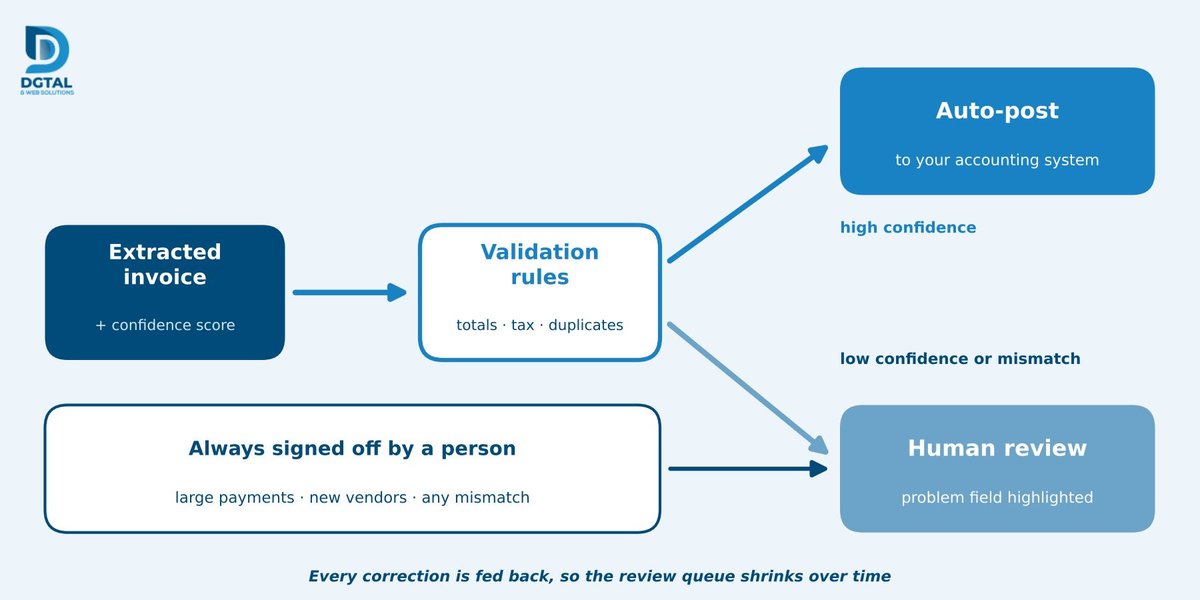
- Confidence thresholds. You decide how sure the system must be before something is approved automatically. Everything below that line gets reviewed.
- Approval checkpoints on high-stakes items. Large payments, new vendors and any mismatch can always require a human sign-off, no matter how confident the system feels.
- Audit logs. Every extracted value can be traced back to the exact spot on the source document, which makes audits and disputes much easier.
- Learning from corrections. When a reviewer fixes a value, the fix feeds back into the system, so the review queue should shrink over time.
Connecting it to the systems you already use
A common worry is that adopting IDP means ripping out your accounting or ERP system. It doesn't. A good pipeline connects through APIs to what you already run, whether that's an ERP, QuickBooks, Xero, a CRM or a SQL database. The extracted data lands where your team already works, in the format those tools expect.
Security deserves a straight conversation, because invoices and identity documents are sensitive. Ask about encryption in transit and at rest, and about where your data is processed. For particularly sensitive material, private VPC or on-premises deployment options exist, so your documents never have to leave your own environment.
Case study: from weeks to hours (PSIC)
A good example of a document-heavy process automated from start to finish is the feasibility engine we built for the Punjab Small Industries Corporation (PSIC).
Preparing a feasibility study is the kind of work that swallows time: gathering inputs, modelling costs, building financial statements and pulling it all together into a formal report. The engine automates that whole chain. It models capital expenditure (Capex), operating expenditure (Opex) and working capital, produces five-year financial projections, and calculates net present value (NPV), internal rate of return (IRR) and break-even analysis. The result is an audit-ready PDF report.
What used to be measured in weeks is now measured in hours, with people still reviewing and approving everything that goes out. We'll share exact before-and-after timings once they're confirmed for publication.
The lesson: it's the same one as with invoices. Where work is rule-guided and heavy on documents, the repetitive layer can be automated while people keep the decisions.
How to start: choosing your first process
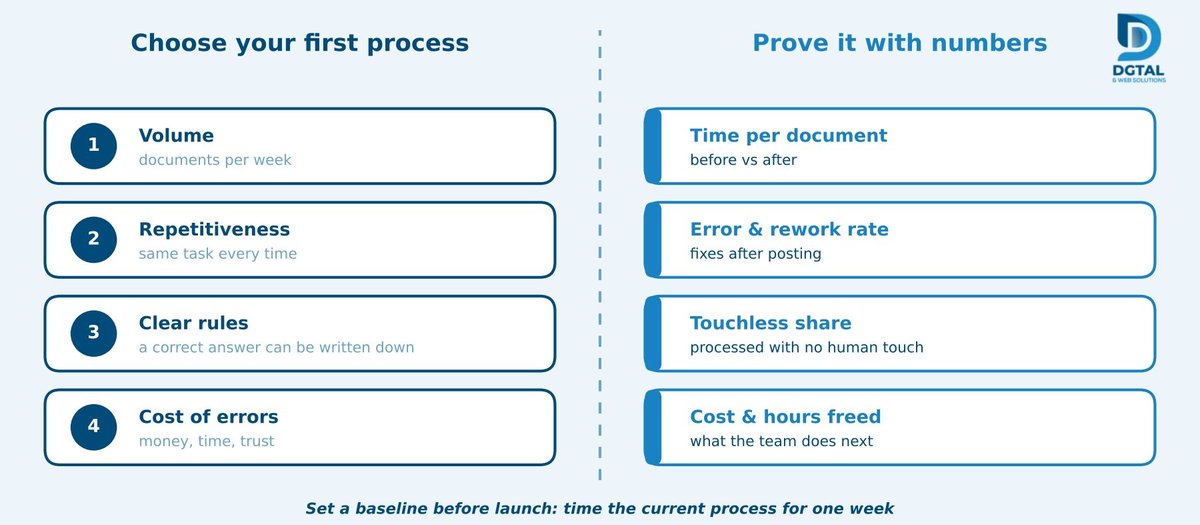
You don't have to automate everything at once. Good first candidates are invoices, onboarding verification, feasibility reports and spreadsheet consolidation. To choose between them, score each process on four questions:
- Volume: how many documents arrive each week?
- Repetitiveness: is it the same task every time?
- Clear rules: could you write down how a correct result is decided?
- Cost of errors: what does one mistake cost you in money, time or trust
Whichever process scores highest across all four is your best starting point. A first pipeline can typically launch in two to four weeks. Start small, measure what happens, then move on to the next process.
Measuring ROI
The simplest way to prove IDP is working is to measure it. Keep an eye on four things:
- Time per document, before and after.
- Error and rework rate, meaning how often a record has to be corrected after posting.
- Percentage processed without human touch, which shows how much of the flow is fully automated.
- Cost per document and staff hours freed, so you can see what your team does with the time it gets back.
Set a baseline before launch. Spend a week timing the current process and counting errors. Without that starting point, any improvement is just a feeling, not a result.
Conclusion
IDP takes away the retyping and leaves the decisions with your people. It reads messy documents, checks its own work, hands uncertain items to a person and delivers clean data to the systems you already use. Start with one process, measure it against a baseline and let the numbers tell you what to do next.
Ready to look at one process? Book a free consultation with DGTAL & Web Solutions and we'll go through one of your document-heavy processes with you. If you'd rather see it in action first, just ask for a demo.
Frequently Asked Questions
1. How is IDP different from OCR?
OCR only converts an image of text into characters. IDP goes further: it understands which text is the invoice number, the date or the total, checks those values against each other and sends uncertain results to a person.
2. Will it work if our suppliers use different invoice layouts?
Yes, and that's one of its biggest strengths. Vision-language models read the whole page instead of relying on fixed field positions, so a new or redesigned layout won't break the process the way it breaks a template. Very poor scans may still need a human check.
3. Do we have to replace our accounting software?
No. IDP connects through APIs to tools like QuickBooks, Xero, ERP systems, CRMs and SQL databases, so the extracted data flows into the systems your team already uses.
4. Is it safe to process sensitive documents this way?
Data is encrypted in transit and at rest, and for sensitive material, private VPC or on-premises options keep your documents inside your own environment. Audit logs let you trace every extracted value back to its source document.