Stop Answering the Same Question Twice: How an Internal Knowledge Assistant Gives Your Team Their Hours Back
Staff lose hours every week searching for documents and asking colleagues the same questions. An internal knowledge assistant, built on retrieval-augmented generation (RAG) over your company's own documents, answers those questions with sources and hands off to a person when it isn't sure. This article explains how it works, walks through a transparent hours-saved example with conservative, expected and optimistic scenarios, and covers use cases, document preparation, security, rollout and measurement.
The question that gets asked 40 times
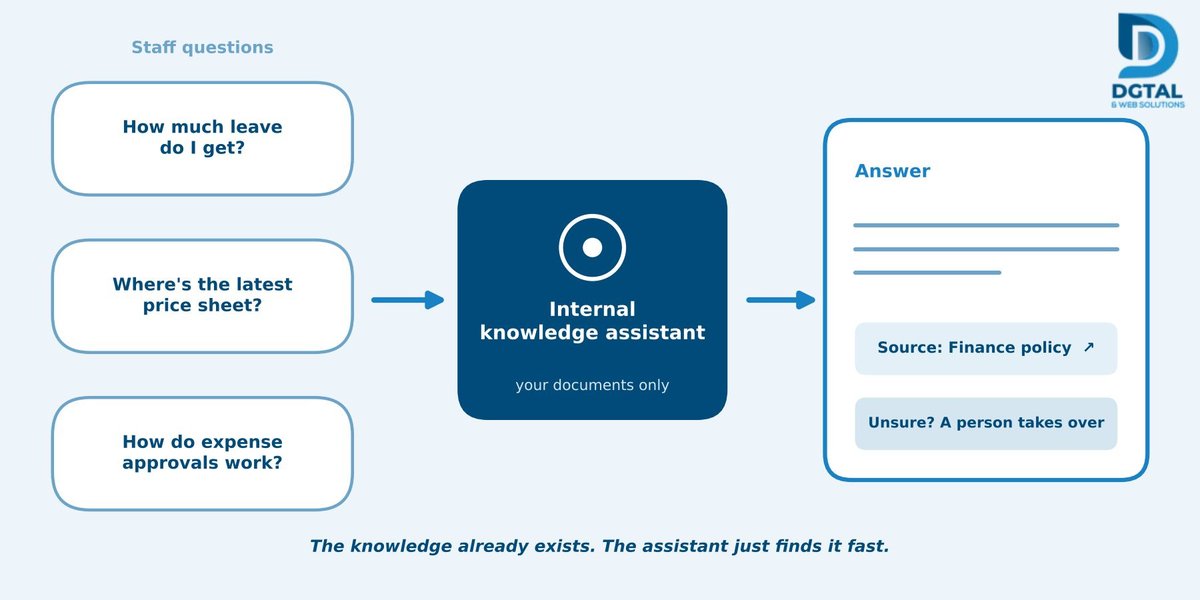
A new hire asks HR how much leave they get. A salesperson asks operations for the latest price sheet. A manager asks finance how expense approvals work. By Friday, someone has answered each of those questions several times, usually by pasting the same link or retyping the same paragraph.
Every one of those questions interrupts two people: the one asking and the one answering. Neither of them planned to spend the morning on it.
The key point: the knowledge already exists. It's sitting in policies, handbooks, price lists and process documents. The real problem is that nobody can find it quickly.
An internal knowledge assistant is a company chatbot that answers staff questions from your own documents, shows where each answer came from and hands the question to a person when it isn't sure. In this article we'll look at how it works, how to estimate the time it could save and how to start without overreaching.
Where the hours actually go
Before you look at any technology, look at where your team's week disappears. In most companies it falls into four places.
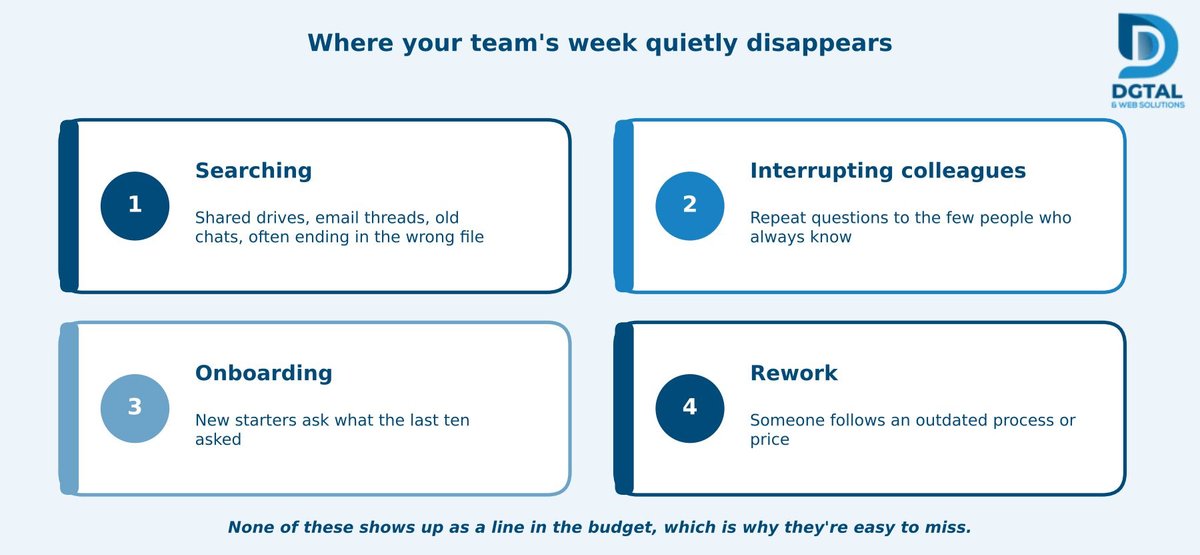
- Searching. Shared drives, email threads and old chat history, often ending with the wrong version of a file.
- Interrupting colleagues. Repeat questions land on the same few people who always seem to know.
- Onboarding. New starters ask what the last ten asked, and senior staff answer it all over again.
- Rework from outdated documents. Someone follows an old process or quotes an old price, then has to redo the work.
None of these shows up as a line in the budget, which is exactly why they're easy to overlook. A simple worksheet makes them visible. Fill it in with your team for a typical week.
What an internal knowledge assistant actually is
In plain terms, it's a chatbot that answers staff questions using your company's own documents, not the open internet. You ask, "What's the process for approving an expense over a certain amount?" and it replies from your finance policy, with a link to the source.
That makes it different from the two chatbots most people already know.
- A rule-based FAQ bot follows fixed scripts and menus. It's fine for a short list of predictable questions, but it can't answer anything its builders didn't anticipate.
- A generic public chatbot knows a lot about the world but nothing about your company, and it can sound very confident while guessing.
An internal assistant sits between the two. It handles questions phrased in many different ways, because it understands language, but it answers from your documents. And it usually lives where your team already works: Slack, Microsoft Teams, a web widget on your intranet or WhatsApp.
How it works: RAG in plain language
Most internal assistants use a technique called retrieval-augmented generation, or RAG. The name sounds technical, but the idea is simple: find the right passages first, then write the answer from them.
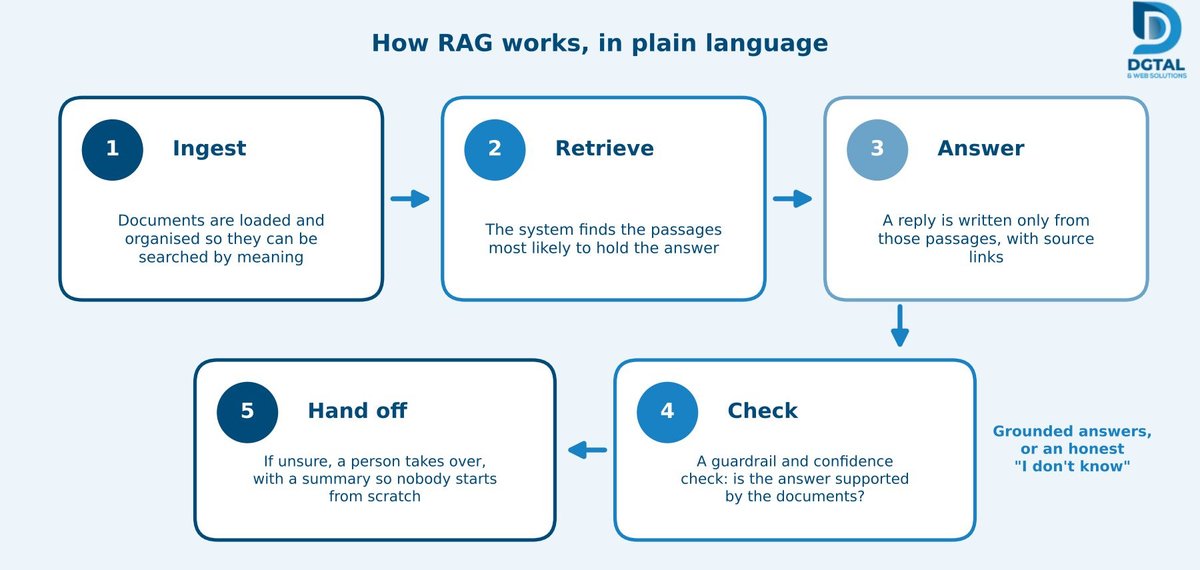
- Ingest. Your documents are loaded and organised so they can be searched by meaning, not just by keyword.
- Retrieve. When someone asks a question, the system finds the passages most likely to contain the answer.
- Answer. It writes a reply based only on those passages and links to the sources, so the person can check for themselves.
- Check. Before replying, a guardrail and a confidence check decide whether the answer is actually supported by the documents.
- Hand off. If confidence is low, the question goes to a person along with a summary of the conversation, so nobody has to start from scratch.
Why grounding matters. A good assistant says "I don't know" instead of guessing. A wrong answer about leave policy or expense limits is worse than no answer, because people act on it. Grounding every reply in your documents, and admitting when it can't, is what makes the tool trustworthy.
The math: how 15+ hours a week can add up
You'll see claims online that a company chatbot saves a certain number of hours a week. Treat any such figure as an example to be shown with its working, not a promise. Here's a transparent version, with every assumption labelled so you can swap in your own.
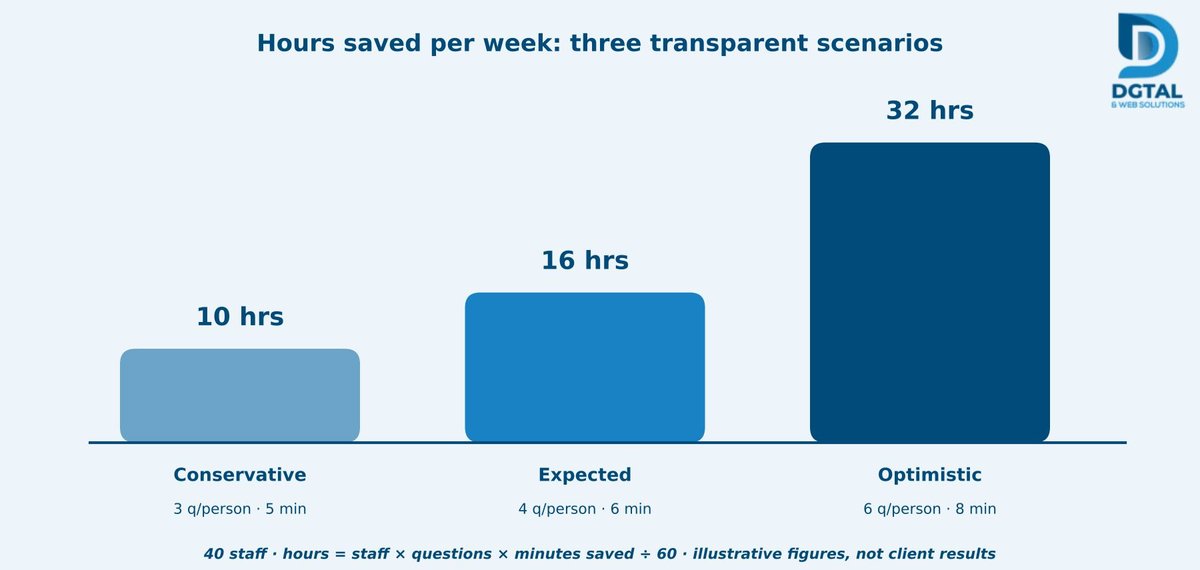
| Assumption or result | Conservative | Expected | Optimistic |
|---|---|---|---|
| Staff using the assistant | 40 | 40 | 40 |
| Questions per person per week | 3 | 4 | 6 |
| Minutes saved per question (net) | 5 | 6 | 8 |
| Hours saved per week | 10 | 16 | 32 |
In the expected case, 40 people asking 4 questions a week and saving 6 minutes each adds up to about 16 hours a week. That's where a figure of "15+ hours" can come from. The conservative case gives 10 hours, and the optimistic case 32.
What the example leaves out. "Minutes saved" is net of the time spent on questions the assistant can't answer, and it counts only the asker's time. It ignores the time saved for the colleague who no longer gets interrupted, which in practice is often real.
Honest limits. Results depend on how many questions your team really asks and on how good your documents are. A small team with well-organised files may save less. A larger team with scattered knowledge may save more. Run your own numbers before you promise anything to anyone.
Best use cases to start with
Pick one area with a steady flow of repeat questions and documents that already exist.
- HR and onboarding: leave, benefits, policies and first-week guides.
- Sales enablement: product details, pricing rules and objection handling.
- IT and operations: how-to guides, access requests and standard operating procedures.
- Finance: expense, invoice and approval processes.
- Compliance: policy lookups with source citations, so people can show where an answer came from.
Getting your documents ready
The assistant is only as good as the content behind it. If your documents contradict each other, the answers will too. A little preparation does more for quality than any clever setting.
- Audit and clean first. Remove duplicates and outdated versions, and decide which document is the official one.
- Assign an owner to each document set. Someone has to be responsible for keeping HR policies, price sheets and SOPs current.
- Set access controls. The assistant should only show each person what they're allowed to see, so a general staff member can't pull up confidential material.
- Expect gaps. The questions the assistant can't answer are a useful to-do list of missing or unclear documents.
Trust, security and control
Staff will only use the assistant if they trust it, and leaders will only approve it if the risks are covered. Look for these features:
- Human handover with a conversation summary.
- Source citations on every answer.
- Audit logging of questions and answers.
- Encryption in transit and at rest, with private VPC or on-premises options for sensitive data.
It's also fair to ask any provider how your data is handled, including whether it's used to train public models. Get the answer in writing, and be wary of vague reassurance.
Rolling it out: a realistic timeline
A standard assistant typically takes 10 to 14 business days to set up. More complex setups, with many document sources or custom integrations, typically take 3 to 4 weeks. Integrations with tools such as Slack, Teams, HubSpot, Salesforce and Zendesk are common.
Even so, resist the urge to launch to everyone at once. Pilot with one department, gather feedback, fix the gaps and then expand. A pilot also gives you real numbers to replace the illustrative ones above.
Measuring success, and what the metrics really mean
Set a baseline before launch, using the worksheet earlier in this article. Then track:
- Questions answered without human help. Useful, but deflection rate alone can mislead. A bot can "deflect" a question by giving a poor answer, so pair this number with accuracy checks.
- Staff satisfaction (CSAT) and accuracy spot checks. Review a sample of answers each week against the source documents.
- Time to find information, before and after.
- Repeat questions still reaching HR, IT and operations.
- Unanswered questions, treated as a to-do list for improving your documents.
Common pitfalls
- Feeding the bot messy or contradictory documents. It will reflect the mess straight back to your staff.
- No owner for keeping content current. The assistant slowly goes stale, and people stop trusting it.
- Launching to everyone at once. Mistakes become company-wide before you've had a chance to learn from them.
- Treating it as a replacement for people. It's a first line of help. People still handle judgment calls, exceptions and sensitive cases.
Conclusion
The hours saved come from fewer searches and fewer interruptions, with people still making the judgment calls. Start with one department, measure against a baseline and let your own numbers decide how far to go.
Want to scope a pilot? Book a free consultation with DGTAL & Web Solutions and we'll map a pilot for one department with you. If you'd like to see an assistant in action first, a demo is available.
Frequently Asked Questions
How is an internal knowledge assistant different from a normal chatbot?
It answers from your own company documents rather than the open internet, shows the source of each answer and passes the question to a person when it isn't confident.
Will it replace our HR or IT staff?
No. It handles repeat, document-based questions so that people can spend their time on judgment calls, exceptions and sensitive issues.
How long does it take to set up?
A standard assistant typically takes 10 to 14 business days, and more complex setups typically take 3 to 4 weeks. Starting with a single-department pilot is the safest route.
Can it show different people different information?
Yes, it should. Access controls make sure each person only sees material they're permitted to see, which is worth confirming during setup.